Showing posts with label php output. Show all posts

Saturday, 15 March 2014

Timestamps in php

timestamps in php
Timestamps in php programming language  Timestamps are widely used a standard used by php in order to keep track current time and current day in fact we had functions retrieve us current week and months the things like that. timestamps is numeric value or as integer value amount of second from the first of January 1970.

Code for time function (Screenshot1) :-

time function php
Time Function Screenshot1

<?php
echo time();
?>

Output (Screenshot 2,Screenshot3) :-

time function php
Screenshot2
time function php
Screenshot3
In this example time is function which echo out seconds from 1st January 1970 to today’s time seconds reached. Function returns current unit time stamps. As you can see output every time you refresh it will increase by seconds.So, its very useful to keep track of amount of second or current time depending upon you like if you want to track when the comment is posted when you posted on you post. But its not user-friendly because we are echoing the seconds not in human reader format.

Code for date and time function (Screenshot4):-

date and time function php
Screenshot4


<?php

$time = time();

$actual_time = date('H:i:s', $time);

echo 'The current time is '.$actual_time;

?>


Output (Screenshot5):-

date and time function php
Screenshot5
In this example i had created variable time with timestamp and we create actual_time in that we will process date function it takes two argument first how you want to display and we had key for different things to use second arguments here it is timestamp most common way to process first argument to display is H:i:s hour Minute and second. As you will see output it will be same time where in your system time i mean computer time. Timestamps updated dynamically.

Code for date and time function (Screenshot6):-

time date function php
Screenshot6


<?php

$time = time();

$actual_time = date('D M Y', $time);

echo 'The current time is '.$actual_time;

?>

Output (Screenshot7) :-

date time function in php
Screenshot7

In this example its a date month and year for current timestamps which is updating dynamically there are many other methods to get different formats of timestamps this are few examples from it.

Code for date and time function (Screenshot8):-

time date function in php
Screenshot8


<?php

$time = time();

$actual_time = date('D M Y @ H:i:s', $time);

echo 'The current date/time is '.$actual_time;

?>

Output (Screenshot9) :-

timestamps
Screenshot9


In this example its a current date month year and current time you have lot more its just few of them try your self.
Read More

Saturday, 8 March 2014

Associative arrays in php

php arrays
Associative arrays in php programming languages.  Now in last tutorials we talk about arrays in this tutorials we looking for associative arrays. Now associative arrays stores data in same way but allows you to change keys from 0,1,2,.. to name of your choice.

Code for associative arrays (Screenshot1) :-

associative arrays
Screenshot1

<?php

$food = array('Pasta'=>300, 'Pizza'=>1000,'salad'=>150,'Vegetables'=>50);

print_r($food);

?>

Output Screenshot 2

Associative arrays in php
Screenshot2


If i want to add some elements to array such as foods name with his calories you many find in food for example now in basic array we seen that pasta had key value 0. In this example what i want to do is rather then having pasta key 0. i want to assign value to the pasta as well as same for pizza salad and vegetables for assigning key to variable i will equal and
greater then sign so, for pasta we may say 300 calories, pizza we can say equal and greater then 1000 calories,salad we may say 150 calories and in vegetables we may say 50 calories. so, in output you can see our key of  pasta is holding key of 300,our key of pizza is holding key of 1000, our key of salad is holding key of 150 and vegetables holding key of 50. Now if you echo $food[0]; it will echo blank because technically now its not the value  of 0. Now its became a associative array because we are associating pasta with value of 300.

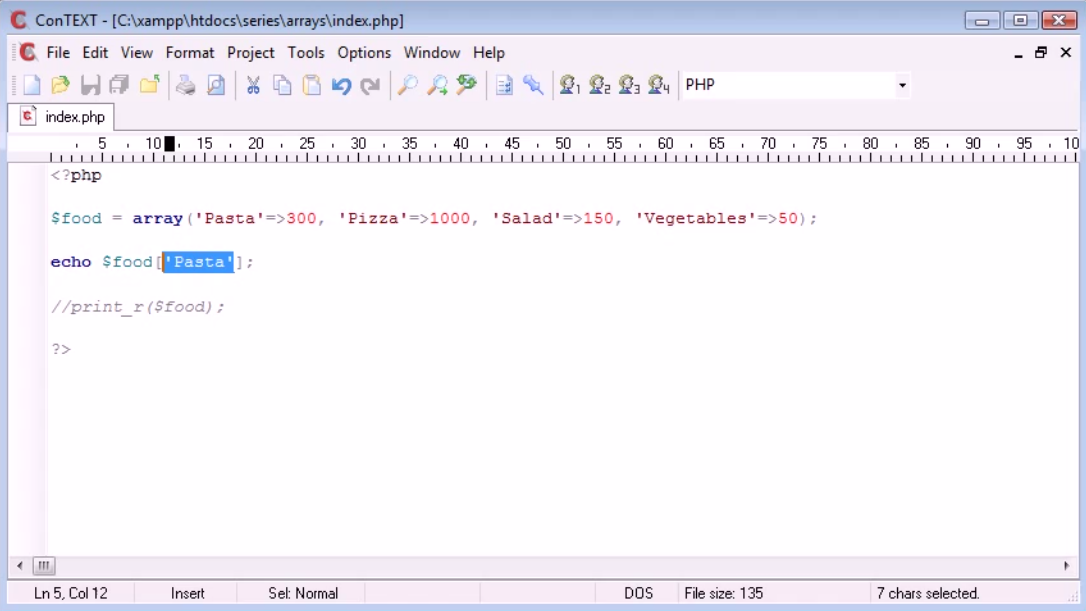
code for associative arrays (screenshot 3):-

Associative arrays
Screenshot3

<?php

$food = array('Pasta'=>300, 'Pizza'=>1000,

'salad'=>150, 'Vegetables'=>50);

echo $food['pasta']

//print_r($food);

?>

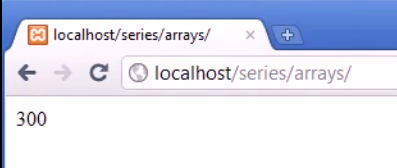
output (Screenshot 4):-

associative arrays in php
Screenshot4
so, now we echo out contain of pasta it will give 300. In same way you can see the calories in pizza , salad and vegetables. so, this we created associative array to associating values to different keys and its by association so, now you will understand why it is called associative arrays. so, this is a best way in php specially when you do with databases later on. In database you know what fields are and columns are you have option to use associative array when you gain data from database. so, associative array is really really good to use specially when you don’t want to remember 0 , 1
,2 because that can be bit annoying so, this is basically associative array in php.
Read More

Saturday, 1 March 2014

Functions With a Return Value in php

In this tutorial we are going to deal with function with a return value.We have already seen two other tutorials of basic function and function with arguments. Generally we echo out the content of function inside it only,but if we want to echo out the content outside the function, we will use “return” keyword. Here, “return” keyword returns a specific value the value which can be calculated inside function that can be a string or integer value. Hence the value which is returned outside the function and is stored in any variable of the same datatype as that of variable that is being returned, can be echoed out easily. Example:- If we want to divide two number before adding it as:- (10, 10)/ (5, 5) = 2 Here,10 should get added with 10 and 5 should get added with 5 & then divide 20 / 10 which will give 2 as answer (Screenshot1).

Function WIth a return value in php
Screenshot1

Code for function with a return value (Screenshot2):-

Code for Return value in function
Screenshot2


<?php


function add($number1, $number2) {

$result = $number1 + $number2;

return $result;

}


add(10, 10);


?>

Output (Screenshot3):-

return value
Screenshot3
In this example, I have created the function for adding two number and storing value to “result” variable and then return the value from functions. Here, it will not echo out anything in browser because its just storing value to function by return keyword.

Code for function with return value (Screenshot4):-

Return value in functions
Screenshot4

<?php


function add($number1, $number2) {

$result = $number1 + $number2;

return $result;

}


echo add(10, 10);


?>

Output (Screenshot5):-

Function In Php
Screenshot5
In this example, I have created the function for adding two number and storing value to “result” variable and then return the value from functions. Here, it will echo out values via variable “sum” by calling functions.

Code for functions with return value adding and divide it(Screenshot6):-

Function return value
Screenshot6

<?php


function add($number1, $number){

$result = $number1 + $number2;

return $result;

}


function divide($number1, $number2) {

$result = $number1/ $number2;

return $result;

}


$sum = divide(add(10, 10), add(5, 5));

echo sum;


?>

Output (Screenshot7):-

php functions
Screenshot7
Here,firstly we have to make two functions to add two variables and then divide them. As we seen in screenshot4 we are adding two number by calling function, passing values to variables, storing values of the result and then retrieving value of result outside the function. Similarly, for divide function too.It will work as in first (Screenshot1) (10 + 10) / (5 + 5) = 2.
In this way you can use function many time by calling and passing variables; every time functions variables will be changed which is every useful for us to reuse the functions. Its easy for the programmer as it shorts the codes in the program.
Read More

Thursday, 27 February 2014

For Loop in php


For Loop In Php Programming Languages. This tutorial is for “For Loop”. Now syntax of For Loop is bit complicated. Also,its structure is slightly different. If we make blogs related to For loop you must observe that its similar to While Loop and Do While Loop. However, in For Loop what we are doing is we use three expressions within this brackets.These three expressions are ,firstly to initialize the variable then control the loop by giving a definite condition to the variable and lastly increment the initialized value of variable.


Code for For loop (Screenshot1):-

For loop in php
Screenshot1

Output (Screenshot2):-

For Loop In Php
Screenshot2
In this example, I am firstly declaring variable “count” in For Loop,secondly evaluate whether condition is true or false i.e.count is greater than or equal to ten and lastly increment the value of count.In For Loop,”;” sign between these expressions is must.Second expression will only get executed after execution of first expression and third expression will only get executed after execution of second expression whenever any For Loop is called for the first time in program.But from second time onward it will only execute second and third expressions,since the initialization of variable is done while calling the For Loop for the first time.
Html tags should be in single inverted commas at echo function of php programming languages.

Code for For loop (Screenshot3):-

Loops
Screenshot3

Output (Screenshot4):-

for loop in php
Screenshot4
In this example, we are counting from 10 to 1 by decremented the value of variables.So, this is basic For Loop in php.
Read More

Do While Loops In Php

This tutorial is for Do While Loop.Now we had looked while loops that basically count to 10 and prints hello each time it is incremented. Do while loop is very similar to while loop,only a minor difference is that we don’t check whether condition is true or false or we don’t evaluate condition in start. Do while loop always runs the loop once.

Code for Do While Loop (Screenshot1):-

Do While Loops
Screenshot1

Output Screenshot2

Do While Loops In Php
Screenshot2
In this example we are using “do” keyword that will not check conditions but will perform whatever we tell to do and after that in while loop it will check condition. In above example, we have echo out in do loop “This will ALWAYS show” and in while statement we have false that condition.

Code for Do while loop (Screenshot3):-

Do while loops
Code for do while loops Screensot3

Output (Screenshot4):-

Screenshot4
In this example we are doing same thing as we did in while loops Examples .In this we are echoing out “This will ALWAYS show” 10 times where we set counter to start with value 1 and incremented it up-to value 10. If while loop condition get false it will always echo it out once by do loop. The main aim of using Do While Loop is that as it name refers it will first echo out once any statement/process declared inside “do statement” and only after executing that part it will move for executing “do statement” further on the basis of declared conditions in “while statement”.
Read More

Monday, 17 February 2014

Assignment Operators in php

Assignment Operators in php
Assignement operators in php
This is tutorial of Assignment Operators in PHP With Examples.We have already seen a glimpse about these operators in previous tutorials eg. $number1 = 10; In this “equal to(=)” is assignment operator in php that is assigning value to number1 here sign “=” is not comparing variables but its assigning value to variables.

Assignment operators in php
Code for Assigment Operator Screenshot1
<?php


$number1 = 10;


$number1 += 2;


echo $number1;


?>


Output (Screenshot2):- 

assignment operators in php
Screenshot2
In this example,we are assigning variable $number1 = 10 and we can increment its value by taking $number1 += 2 ,which is an easy way to write code and its known as assignment operators.

Code for Assignment operators (Screenshot3):-

Code for assignment operator
Code for Assignment operator Screenshot3
<?php


$number1 = 10;


$number1 -= 2;


echo $number1;


?>

output (Screenshot4):-

Assignement operators in php
Screenshot4
Similarly as above, we can decrements its value by taking $number1 -= 2.

Code for Assignment operators (Screenshot5):-

Screenshot5
<?php


$number1 = 10;


$number1 *= 2;


echo $number1;


?>

output (screenshot6):-

Assignment operators in php
Screenshot6
Multiplication variables with Assignment Operators

Code for Assignment operators (Screenshot7):-


assignment operators in php
Screenshot7
<?php

$number1 = 10;


$number1 /= 2;


echo $number1;


?>

output (screenshot8):-

assignment operators
Screenshot8
Dividing variables with Assignment Operators

Code for Concatenate and Assignment operators (Screenshot9):-

Code for Concatenate and Assignment operators
Screenshot9
<?php


$text = 'Hello';


$text .= 'World';


echo $text;


?>

output (Screenshot10) :-

assignement operators in php
Screenshot10
In this we can concatenate with assignment operators.
$text .= ‘ World’;
concatenate with $text = ‘ Hello’
instead of this, we can write $text = ‘Hello’.'World’;.
This is example of how to concatenate string with other string using assignment operators.This are basic examples of assignment operators and how we can assign values of different variables or plain text itself in php.
Read More

If_else If Statement in php

php if else if statement
if_ else if Statement in php
This is tutorial about if_else if statement.

Code for if_else if statement(Screenshot1):-

if_else if Statement in php
If_else If Statement Screenshot1

<?php
$number= 10;
if ($number==10) {
echo 'equal to ten.';
} else if ($number==11){
echo 'Equal to eleven.';
} else{
echo 'Not equal.';
}
?>

output (Screenshot2):-

If else if statement in php
Screenshot2
In “if_else statement” we can also evaluate one variables with many strings? For example we suppose
variable $number=10 in if_else statement as we did in “if statement”, its output will be equal to 10.
If value is 11 or any other value in “else_if statement”,it will echo out 11 if it is actually equal
to 11.Again in “else statement” if value is not equal to 10 niether 11 then it will echo out “Not
equal”. In this way you can evaluate many variables at a time with help of “if_else if_else
statement”.

Code for if_else if Statement(Screenshot3):-

if_else if Statement (Screenshot3)


<?php
$number= 11;
if ($number==10) {
echo 'equal to ten.';
} else if ($number==11){
echo 'Equal to eleven.';
} else{
echo 'Not equal.';
}
?>


output (Screenshot4):-

if_else if statement in php
Screenshot4

In this code of “if_else statement” it will execute because $number=11 is true. It will echo out
eleven.

Code for if_else if statement(Screenshot5):-

if_else if statement in php
Screenshot5

<?php

$number= 12;

if ($number==10) {

echo 'equal to ten.';

} else if ($number==11){

echo 'Equal to eleven.';

} else{

echo 'Not equal.';

}

?>


output(Screenshot6):-

if else if statement in php
Screenshot6
In this code of “if_else if_else statement” it will firstly compare values inside “if statement” and
“else_if statement ” and if the comparison is false ,thus will execute “else statement” because
variable is 12 and it is not equal to 10 or 11.
Read More

About Me

Welcome to Extra Tutorials! My name is Mohammed and I am the 22 year writer, website developer, and photographer behind the blog. Thanks for visiting! Tutorials Jackpot… In addition to Developer, I love to develop websites and I love to write. Starting a php Blog was inevitable for me. What began as a simple way to share all of my Tutorials with friends and family has developed into my Part time job.

Mohammed Padela

WHAT IS PHP PROGRAMMING

WHAT IS PHP PROGRAMMING

Follow Us

Popular Posts

Designed ByBlogger Templates