Showing posts with label name. Show all posts

Friday, 28 March 2014

Explode function with file handling example

php explode implode function
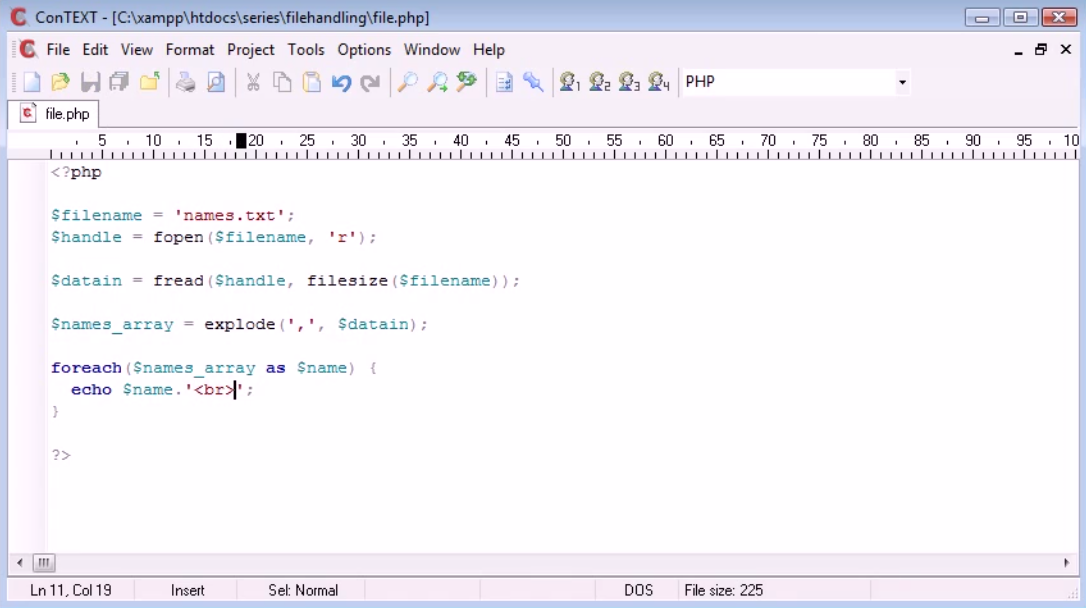
The explode function with file handling example in php programming language. Will read the file. echo out to the user for reading the data of the file by file handling in php programming language.

Code for explode function with file handling example(Screenshot1)
explode function file handling php
Screenshot1

<?php


$filename = 'names.txt';

$handle = fopen($filename,'r');


$datain = fread($handle, filesize($filename));


$names_array = explode(',', $datain);


foreach($names_array as $name) {

echo $name. '<br>';

}


?>

Output (Screenshot2,)

php explode function
Screenshot2
In this example we are going to learn to read data from a file but obviously when u are reading data from the file. Its not always line by line basis. You may find commas separating your values and in this case we got few names here commas separated each value. Now how we deal with reading this in. Php file handling reading into the file. 

$handle fopen($filename, 'r');

Above code will create a handle to open and reading the file r stands for reading the file. We can also use file function which i had shown in example of file handling reading to the file. or we can also write  $handle fopen('names.txt','r');. I have taken names.txt in variale $filename for futhur use.

$datain = fread($handle, filesize($filename));

Above code will inilize the filesize will tell php file contain that much data instead of writing filesize we can also write the character we want from the file. like fread($handle,100); that's means it will contain 100 characters from the file.


$names_array = explode(',', $datain);

It will explode all commas from the file. Will remove commas from the file array of the name.

foreach($names_array as $name) {
echo $name. '<br>';
}

It will get array will write names one by one.
Read More

Tuesday, 18 March 2014

SERVER variables script Name

php server variable
$_SERVER variables script name in php programming language. $_SERVER is predefined variable in php. $_SERVER is predefined set of environmental information and it allows you to access information about page the user requests send for example. In this tutorial we will look at file name and how we can useful to us. As $_SERVER is much like $_POST or $_SESSION. What we do if we want to echo out or display to user the current file name of the php script that we are working. Now you don't had necessary everyday application because you know user can already see the file name in address bar. $_SERVER can be useful for us when we are submitting forms.

Code for $_SERVER variable script Name in php (Screenshot1):-

server variable script name
Server Variable Script Name Screenshot1


<?php


$script_name = $_SERVER['SCRIPT_NAME'];


echo $script_name;

?>

Output (Screenshot2):-

server variables Script Name
Screenshot2

In this example we are echo out the user of  scripting file name of php of own. $_SERVER variable will have key such as SCRIPT_NAME it will take script name to variable. Now we had variable $script_name which we using for $_SERVER which is predefined variable SCRIPT_NAME key inside $_SERVER is the environmental information that we are echoing out to the user.Now where it is useful now example we are submitting form and we don't know file name which user current on.

Code for $_SERVER variable script name in php 

index.php (Screenshot3):-

Server Variables Script Name
Index.php Screenshot3


<?php


include 'header.inc.php';


if (isset($_POST['submit'])) {

	echo 'Process 1';

}

?>


anotherpage.php (Screenshot4):-

server variables Script Name
Screenshot4


<?php


include 'header.inc.php';


if (isset($_POST['submit'])) {

	echo 'Process 2';

}

?>

header.ini.php (Screenshot5):-

server variables Script Name
Header.ini.php Screenshot5


<?php

$script_name = $_SERVER['SCRIPT_NAME'];

?>


<form action="<?php echo $script_name; ?>"> method = "POST">

<input type="submit" value="Submit">

</form>

Output:-

server variables Script Name
Screenshot6
server variables Script Name
Screenshot7
Server Variables Script Name
Screenshot8
server variables Script Name
Screenshot9
In this example we had created dynamic submitting form. As you can see header.ini.php had a html from with us. which had action of $_SERVER variable which will identify if user is on index.php page it will echo by submit button process 1 and when user is on anotherpage.php it will echo by submit button process 2. As you see example we had used include function which we had already seen in previous  articles. Now $_SERVER variable will generate dynamic to form what ever page we are it will return that page url. As you can see in Screenshot6 and Screenshot7.

In Screenshot6 and Screenshot7 we are view Source of browser in which you can see it generate url in place of $_SERVER variable in both pages can notice address bar link and form action link.

In screenshot8 and screenshot9 You can see it works on page index.php echo out process 1 and on page anotherpage.php its shows echo out process 2 link of the page is coming from same form and its generating link of one form at both pages dynamically.
Read More

About Me

Welcome to Extra Tutorials! My name is Mohammed and I am the 22 year writer, website developer, and photographer behind the blog. Thanks for visiting! Tutorials Jackpot… In addition to Developer, I love to develop websites and I love to write. Starting a php Blog was inevitable for me. What began as a simple way to share all of my Tutorials with friends and family has developed into my Part time job.

Mohammed Padela

WHAT IS PHP PROGRAMMING

WHAT IS PHP PROGRAMMING

Follow Us

Popular Posts

Designed ByBlogger Templates