Showing posts with label php file. Show all posts

Friday, 28 March 2014

Explode function with file handling example

php explode implode function
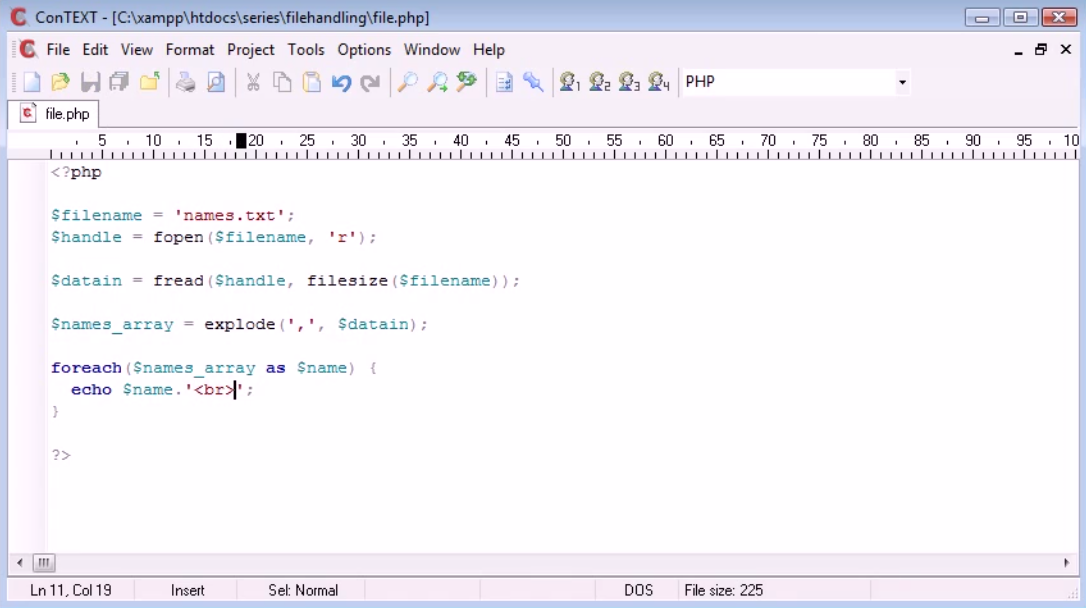
The explode function with file handling example in php programming language. Will read the file. echo out to the user for reading the data of the file by file handling in php programming language.

Code for explode function with file handling example(Screenshot1)
explode function file handling php
Screenshot1

<?php


$filename = 'names.txt';

$handle = fopen($filename,'r');


$datain = fread($handle, filesize($filename));


$names_array = explode(',', $datain);


foreach($names_array as $name) {

echo $name. '<br>';

}


?>

Output (Screenshot2,)

php explode function
Screenshot2
In this example we are going to learn to read data from a file but obviously when u are reading data from the file. Its not always line by line basis. You may find commas separating your values and in this case we got few names here commas separated each value. Now how we deal with reading this in. Php file handling reading into the file. 

$handle fopen($filename, 'r');

Above code will create a handle to open and reading the file r stands for reading the file. We can also use file function which i had shown in example of file handling reading to the file. or we can also write  $handle fopen('names.txt','r');. I have taken names.txt in variale $filename for futhur use.

$datain = fread($handle, filesize($filename));

Above code will inilize the filesize will tell php file contain that much data instead of writing filesize we can also write the character we want from the file. like fread($handle,100); that's means it will contain 100 characters from the file.


$names_array = explode(',', $datain);

It will explode all commas from the file. Will remove commas from the file array of the name.

foreach($names_array as $name) {
echo $name. '<br>';
}

It will get array will write names one by one.
Read More

Wednesday, 26 March 2014

File Handling Writing File in php

File handling writing file in php
File Handling Writing to the File In php Programming Languages. php file handling firstly opening the file in this article i am going to wirte data into file by php File handling. But you may read the data for this there is different attributes like w , r , a, (w)riting  ,  (R)eading , (A)ppend. So, here in this article we are going to use w for writing into the file by php file handling. For File firstly we will create handle which will open the file. Now you can see my localhost screenshot1 there is only one file.php is file which i am handling php file.

file handling writing file in php
Screenshot1

Code for File Handling Writing file in php (Screenshot2)

file handling writing file in php
Screenshot2


<?php


$handle = fopen('names.txt','w');


?>

Output (Screenshot3)

File Handling Writing File In php
Screenshot3
files in php
Screenshot4
File in php
Screenshot5
In this example we had $handle variable which contains fopen function to create the file even  it does not exit. So, First argument we can give is file name itself then we use commas and then second argument we give is whether w- write to the file , r - Read from the file or a - append to the file. In this example i want to write to the file so i am going to use w for writing to the file. and file i am going to called is names.txt. So, Its text file we can open up and we can view it as a text. Now If we execute this php Scripts or If we run this php script.

Screenshot3 On clicking file.php nothing will be the output (Screenshot4) but again returning to localhost in same directory you can see our fopen function php Scripts really works its Created file called name.txt. Screenshot4 and Screenshot5.

Now let's write in names.php by php Scripts.

Code For File Handling Writing File in php(Screenshot6)

File Handling in php
Screenshot6


<?php

$handle = fopen('names.txt','w');

fwrite($handle,'Alex');

?>

Output (Screenshot7)

File Handling Writing to file in php
Screenshot7
fwrite function php
Screenshot8
File Handling writing file in php
Screenshot9


Now In this example we are writing data to the file some data to the file. So, For writing to the file we had created handle for writing to the file we have to address to the file. fwrite  function i am passing to variables first to address where i am writing to therefore i will address to my file for that i had created variable $handle and using that variable to address my file to write in fwrite function and the another argument is the data i am writing to the file called alex. As you can see the output. I will not duplicate the file it will write data in same file names.txt. It will write alex to it. Screenshot7 i am running php scripts file.php for running the php script or to excecute the php scripts. Then in screenshot8 opening names.txt. You can see output in Screenshot9 names.txt.


Now For example If we change name Alex to Billy  because we still got this w - write here all is going to do is its going to it will write again. It will remove alex and will write billy if you want both name together to written in the file let see example.

Code For File Handling Writing File in php(Screenshot10)

fwrite function php
Screenshot10


<?php

$handle = fopen('names.txt','w');

fwrite($handle,'Alex'."\n");

fwrite($handle, 'Billy');

?>

Output (Screenshot11)

File Handling In php
Screenshot11
As you can see the output Alex and Billy i had used "\n" creating new line between alex and billy. So, we can write as many names in this list as we want.

So, This are the basic of writing to a file with  php and in other articles i will show you examples of reading and appending with php file . We can also use array with saving names or any other data to the file for example alex be an element of an array and billy be an element of an array

Code for File Handling Writing file in php(Screenshot12)

fwrite function in php
Screenshot12


<?php

$handle = fopen('names.txt','w');


fwrite($handle,'Alex'."\n");

fwrite($handle, 'Billy');


fclose($handle);


echo 'Written.php';


?>

Output (Screenshot15)

Screenshot15
file handling writing in file
Screenshot16
Important part of the file handling in php is to close the file which we had open by fopen function to close the file we can use fclose function to close the file in php. after writing the data to the file it is important to close the open file in php Scripts.You can see the output in Screenshots. 
Read More

Sunday, 9 February 2014

Installing Xampp Part -2

Xampp
Xampp
This Is Tutorials From Tutorials Jackpot. So once it is downloaded. You have to go through installation process and hope if you get any errors you can go to an Xampp and see you can find any support instructions to follow. So, hope now you had installed Xampp. Now open up something we called Xampp control panel application. What Xampcontrol panel is ? What they say is its a control panel for your services that are included in Xampp. I am not sure what version i am actually running at the moment. In this tutorial, its older version for you because its 2011. When i write this tutorial for you and your control panel looks different. Control panel is available from your programs menu within window, open it and you must see apache and MySQL are running in your control panel. In most cases you use apache and for database you will use MySQL. You can see the screenshot  Xampp Control Panel


Xampp Control Panel
Xampp Control Panel
control panel
Xampp Control Panel
n screenshot 1, apache and MySQL services is running and in screenshot 2 apache and MySQL services are not running. You must start by clicking the start button available in control panel application of Xampp and if you want to stop this apache and MySQL services just click same button which is shown in screenshot 1 i.e stop button. Now both services are running as we can see in screenshot 2 i.e Apache started port [port 80] and MySQL started port [port 3306]. Now to access apache and a file that we are creating in Php. This is pretty simple with MySQL, you can be using a web-application code phpmyadmin and this is link of Xampp. Now, phpmyadmin for startup is a database system you may heard about, If not go to Google search about it see what result it shows to you. You don't need to download phpmyadmin because already it is the link with Xampp. So first thing we have to do is to test that over web-server is active now. You don’t want to type any dynamic ip or anything in your web-browser. What we want to do is we want to be typing localhost. Just simply the localhost and enter and you will see the view shown in screenshot 3. If you got screen out it will show you congratulations message that you have successfully installed Xampp on the server on this system so this remind that Xampp is installed. Now you can access the ip address 127.0.0.1, it entirely depends upon you. But i prefer to use localhost that’s why i am using localhost in my entire tutorial. Now you see at side in screenshot3 in side-panel status, security, documentation, components, phpinfo(), biorhythm. So now we have successfully Xampp is installed. So now we start creating php files for running in Xampp.

localhost
Localhost/xampp/
Now look at in tools phpmyadmin. phpmyadmin is adminstration of your database. You can open through screenshot3 tools >phpmyadmin or direct link localhost/phpmyadmin or 127.0.0.1/phpmyadmin are option to go to the databasephpmyadmin so that also works successfully. So hopefully, Xampp as running in next chapter i will show you where to put php file to run at localhost in Xampp. And this was a brief details about  Installing Xampp Part -2

phpmyadmin
Phpmyadmin

Read More

About Me

Welcome to Extra Tutorials! My name is Mohammed and I am the 22 year writer, website developer, and photographer behind the blog. Thanks for visiting! Tutorials Jackpot… In addition to Developer, I love to develop websites and I love to write. Starting a php Blog was inevitable for me. What began as a simple way to share all of my Tutorials with friends and family has developed into my Part time job.

Mohammed Padela

WHAT IS PHP PROGRAMMING

WHAT IS PHP PROGRAMMING

Follow Us

Popular Posts

Designed ByBlogger Templates